

Phase 3: Curriculum
AI-generated curriculum has a recognizable problem: it sounds like AI-generated curriculum. Flat cadence, generic phrasing, a certain relentless completeness that no real instructor writes in. (Honestly — kind of like this page, because Claude wrote it. 😅) This phase is about solving that.
The output of this phase is curriculum that sounds human — specifically, like the instructor who built the course. It runs in two distinct passes: build the full curriculum first, then transform it into your voice.
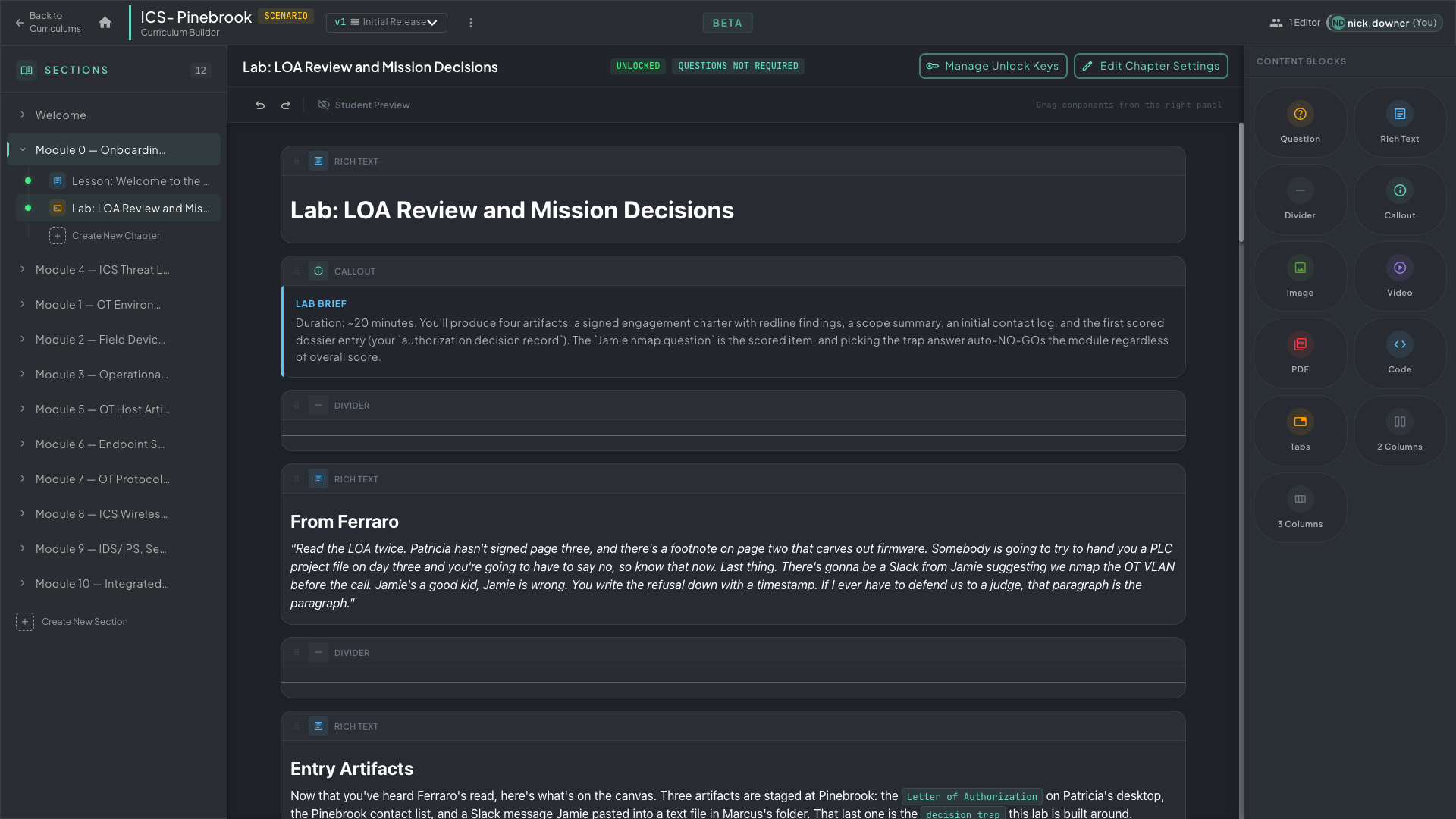 A finished chapter inside the Rogue Arena Curriculum Builder — structured sections, narrative content, and flag-gated progression, all authored by Claude and ready for voice transformation.
Pass 1: Build the Full Curriculum
Section titled “Pass 1: Build the Full Curriculum”Before any voice work happens, Claude builds out the entire curriculum inside the Rogue Arena Curriculum Builder — following the course outline, ensuring every requirement is met, and producing properly structured chapters with sections, content blocks, questions, and flag-gated unlocks. Fully styled and formatted in the platform, not a rough draft in a doc.
This matters because you want a complete, structurally sound curriculum before you start voice work. Trying to transform and critique half-finished content is inefficient — finish the build first, then improve it.
/rogue-curriculum-builder handles this. Give it the course outline, the scenario context, and any specific requirements, and it builds the full curriculum in one pass.
Pass 2: Voice Transformation
Section titled “Pass 2: Voice Transformation”With the full curriculum built, the second pass is transforming it into the instructor’s voice. This is a three-step setup followed by a chapter-by-chapter loop.
The Voice Token Document
Section titled “The Voice Token Document”Grab everything you have — transcripts, slide decks, lab guides, past course recordings, anything where your actual teaching voice shows up — and drop it all on Claude. Tell it to build a voice token document from the material.
Claude pulls out:
- Phrases you use — the specific language you reach for when explaining a concept
- Cadence patterns — how you open a section, how you close one, how you use analogies, when you use short punchy sentences vs. when you build to something
- Things you never say — the constructions that feel wrong when you read them
The result is a reference document that travels alongside every AI writing session. It’s not a style guide — it’s a voice model. The difference: a style guide tells Claude what to avoid; a voice token document tells Claude what to reach for.
The Transform Guide
Section titled “The Transform Guide”Tell Claude to build a transform guide from the voice token document — a structured document it will use to rewrite curriculum material into your voice. It references the voice token document, names specific failure modes to fix (over-explaining, hedging language, passive constructions, excessive bullet lists), and produces before/after examples so the transform is consistent across every chapter.
Critique Agents
Section titled “Critique Agents”Tell Claude to build a set of dedicated critique agents, each focused on a specific failure mode:
- Pacing agent — flags sections that over-explain concepts students can discover through the lab, or that rush through transitions that need more space
- Voice agent — hunts for AI tell-phrases and hedging language the transform didn’t catch
- Pedagogy agent — checks that each section has a clear learning moment, not just instructions
- Realism agent — flags references that won’t feel right to someone with actual ICS/SCADA field experience
The Loop
Section titled “The Loop”With the voice token doc, transform guide, and critique agents in place, set Claude to work chapter by chapter. The loop for each chapter:
- Run the transform — Claude rewrites the chapter into your voice using the transform guide and voice token doc
- Run the critique agents — each agent hunts for its specific failure mode and flags issues
- Claude addresses the punch list and loops until the agents stop finding meaningful problems
- Move to the next chapter
This compounds. By the third or fourth chapter, the initial transforms are already closer — Claude’s outputs in the session have converged toward your voice. By the end, you’re reviewing, not rewriting.
Diagrams and Visual Material
Section titled “Diagrams and Visual Material”Diagrams were drafted in Claude — network topologies, protocol stack visualizations, attack path diagrams — then uploaded to Rogue Arena media. Claude referenced those media assets when building out the relevant curriculum blocks.
The workflow:
- Describe the diagram to Claude (or paste a rough sketch in prose)
- Claude produces the diagram as code (Mermaid, SVG, or a structured description you can render)
- You render and upload it via the media manager
- Claude inserts the media into the appropriate curriculum block with caption text
The diagrams are specific to the scenario — they reference the actual machines, actual network segments, actual protocol flows students will see in the lab. Diagram labels and captions go through the same voice transform as the prose.
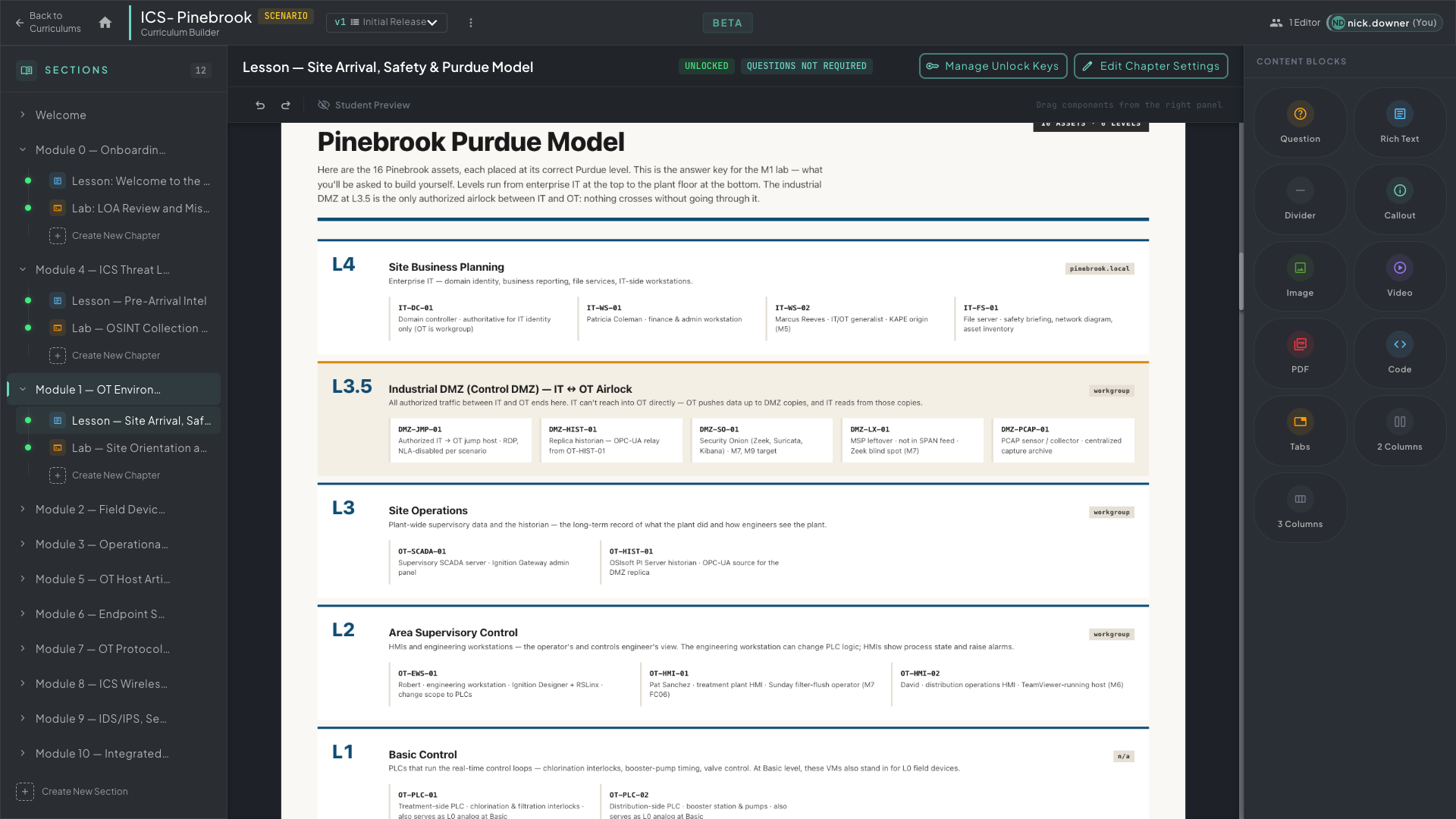 The Pinebrook Purdue Model embedded in a curriculum chapter — drafted by Claude, uploaded to media, and inserted with a caption that went through the same voice transform as the surrounding prose.