

Phase 2: Scenario Design
With 14 validated plugins in hand, the next step is building the scenario they live in. This isn’t just a machine layout — it’s the world students inhabit for the duration of the course.
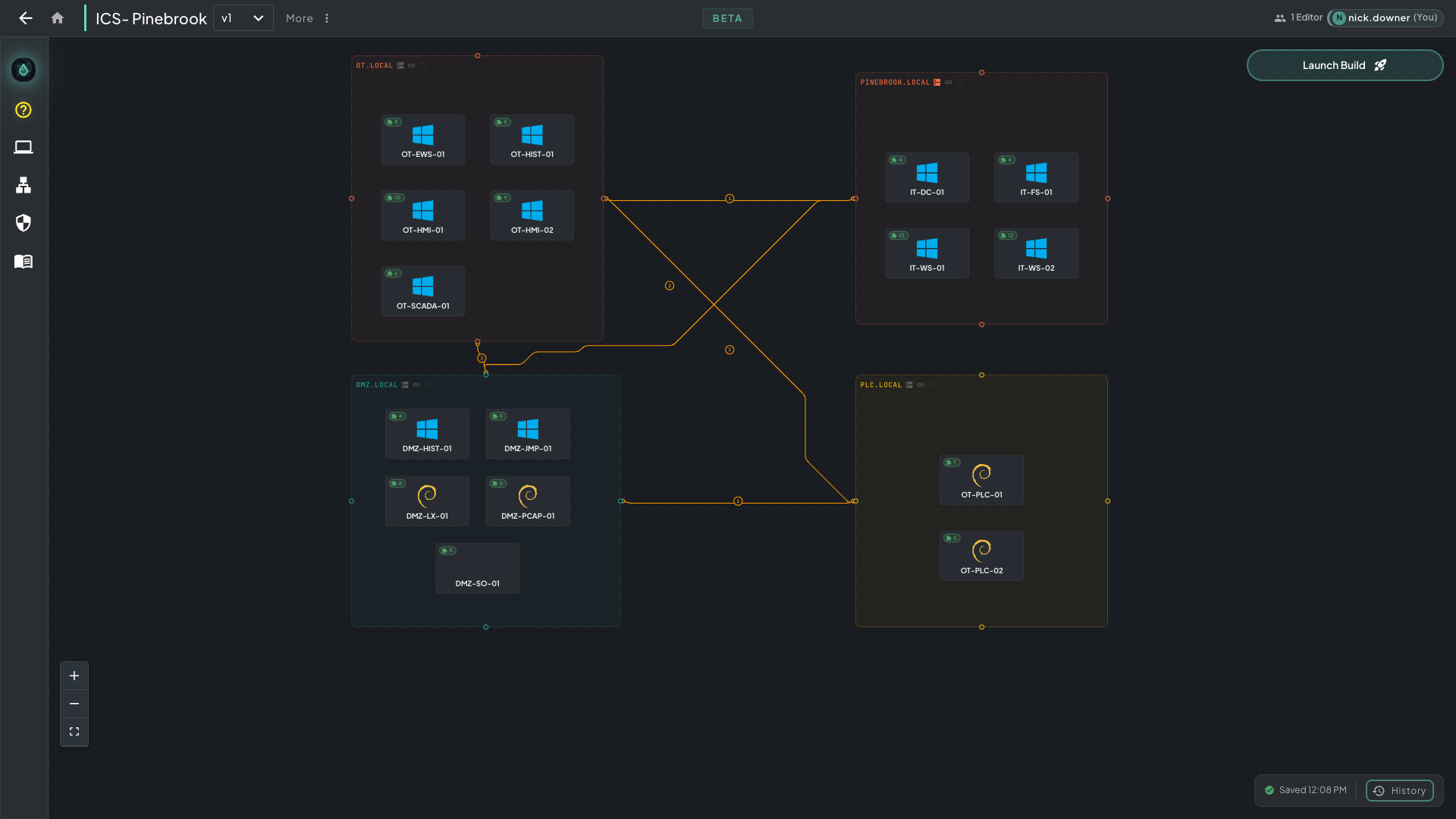 The finished ICS-Pinebrook course canvas — four network segments wired together: the OT floor, the corporate IT domain, a DMZ with Security Onion, and an isolated PLC network.
Starting With a Course Outline
Section titled “Starting With a Course Outline”Don’t launch /architect-brainstorm with a blank slate. Feed it your course outline.
It matters. Go in freeform and you get something plausible — a reasonable-looking topology with no particular purpose. Feed it a real outline and every machine, every service, and every exploit path earns its place, because it maps to something students need to learn.
For this build, the brainstorm was seeded with:
- The full course outline (topics, modules, learning objectives)
- The list of 14 plugins from Phase 1, so Claude knew what tooling was already built and available
- The intended audience and skill level
Claude used /architect-brainstorm to generate the scenario. It produced an in-depth canvas: all machines tagged to relevant plugins, network topology that supports the course’s attack and defense flow, characters and backstories that match the ICS/SCADA industrial context.
Validation Passes
Section titled “Validation Passes”The brainstorm will get you most of the way there. To push it further, just ask Claude to validate the scenario against your goals — it spawns sub-agents to critique and enhance the build plan until it’s right. Point it at specific concerns and it goes deep:
- Plugin coverage — does every plugin from Phase 1 have a home? Are any unused or under-configured?
- Course outline mapping — does working through the scenario in order naturally surface each topic, or does the flow feel forced?
- Industrial realism — for ICS/SCADA specifically, does the topology look like a real OT environment? Are the Purdue model layers represented correctly? Students in this domain often have field experience and will notice when something feels like a toy.
Claude will iterate on the scenario — adjusting machine roles, rewiring services, adding missing pieces — until the critique agents stop finding issues.
The Apprenticeship Frame
Section titled “The Apprenticeship Frame”For this build, we wanted a hands-on learning environment that felt real — not a CTF, not a sterile sandbox. So we told Claude to frame the entire scenario as an apprenticeship, and it ran with it.
Students aren’t “the attacker” or “the defender” in the abstract. They’re a junior analyst or field engineer brought in to work alongside someone more experienced. The machines, the characters, and the curriculum voice all reinforce this — the student is learning a trade, not completing challenges. Character relationships are collegial rather than adversarial, the backstory reads like a real industrial environment, and the arc of the course mirrors how someone actually comes up in this field.
That’s one framing — yours might be different. Tell Claude what kind of environment you want students to inhabit and it’ll carry that through the whole scenario design.
Next: Phase 3 — Curriculum